Knowledge & Memory
Your AI agents remember everything. Understanding how memory works helps you get better results and build smarter systems.
Types of Memory
CapiBot has four types of memory, each serving different purposes:
1. Agent Memory (Personal)
Each agent has their own notes and learnings:
Nova's Memory

📄 project-preferences.md
  - Prefers TypeScript over JavaScript
  - Likes component-based architecture
  - Familiar with client's API patterns

📄 code-style-guide.md
  - Uses 2-space indentation
  - Prefers functional components
  - Always adds PropTypes

📄 helpful-resources.md
  - Links to internal design system
  - Client's API documentation
  - Common utility functions
What it stores:
- Preferences learned from interactions
- Project-specific knowledge
- Style guides and standards
- Helpful resources and links
- Lessons from past work
Access: Only the agent can read/write their own memory
2. Knowledge Base (Shared)
Information accessible to all agents:
Knowledge Base

📁 Decisions
  ├── architecture-decisions.md
  └── technology-choices.md

📁 Lessons
  ├── what-worked.md
  └── what-didnt.md

📁 Projects
  ├── project-alpha-specs.md
  └── project-beta-timeline.md

📁 Commitments
  └── deliverables-schedule.md
What it stores:
- Decisions and rationale
- Lessons learned
- Project documentation
- Commitments and deadlines
- Preferences and standards
Access: All agents can read; you control write access
3. Company Knowledge (Scoped)
Information specific to an AI Company:
Q1 Marketing Company Knowledge

📄 Executive Summary
  Mission: Launch product awareness campaign
  Target: Enterprise customers
  Timeline: 4 weeks
  Budget: $10,000

📄 Brand Guidelines
  Colors: #FF6B35, #004E89
  Tone: Professional but friendly
  Logo usage rules...

📄 Campaign Messaging
  Key value props...
  Target personas...
  Competitive positioning...

📁 Deliverables
  ├── blog-post-1-final.md
  ├── landing-page-design.png
  └── competitor-analysis.pdf
What it stores:
- Executive summary (injected into all agent context)
- Company-specific guides
- Completed deliverables
- Process documentation
Access: Only agents in that company
4. Conversation Memory
Context from ongoing conversations:
Current Session Context

You: Research our top 5 competitors
Nova: I'll research your competitors. Which
      industry should I focus on?
You: SaaS analytics tools
Nova: Got it. I'll focus on SaaS analytics.
      Should I include pricing comparison?
You: Yes, pricing is important
What it stores:
- Recent conversation history
- Context from current thread
- Pending questions/clarifications
Access: Agents in current conversation
How Memory Works
When Agents Remember
Agents automatically remember when:
- ✅ You tell them preferences
- ✅ They complete work successfully
- ✅ They learn from mistakes
- ✅ You explicitly save information
- ✅ They read files and documents
Memory Injection
Before each agent run, relevant memory is injected:
[Agent Memory] + [Knowledge Base] + [Company Knowledge]
         ↓
   Agent Context
         ↓
   Response/Action
This means agents always have relevant context without you repeating yourself.
Memory Persistence
Short-term:
- Current conversation
- Session context
- Active task details
Long-term:
- Agent personal memory (saved to files)
- Knowledge base entries
- Company knowledge
- All stored in PostgreSQL
Memory Browser
Access from nav rail: Memory
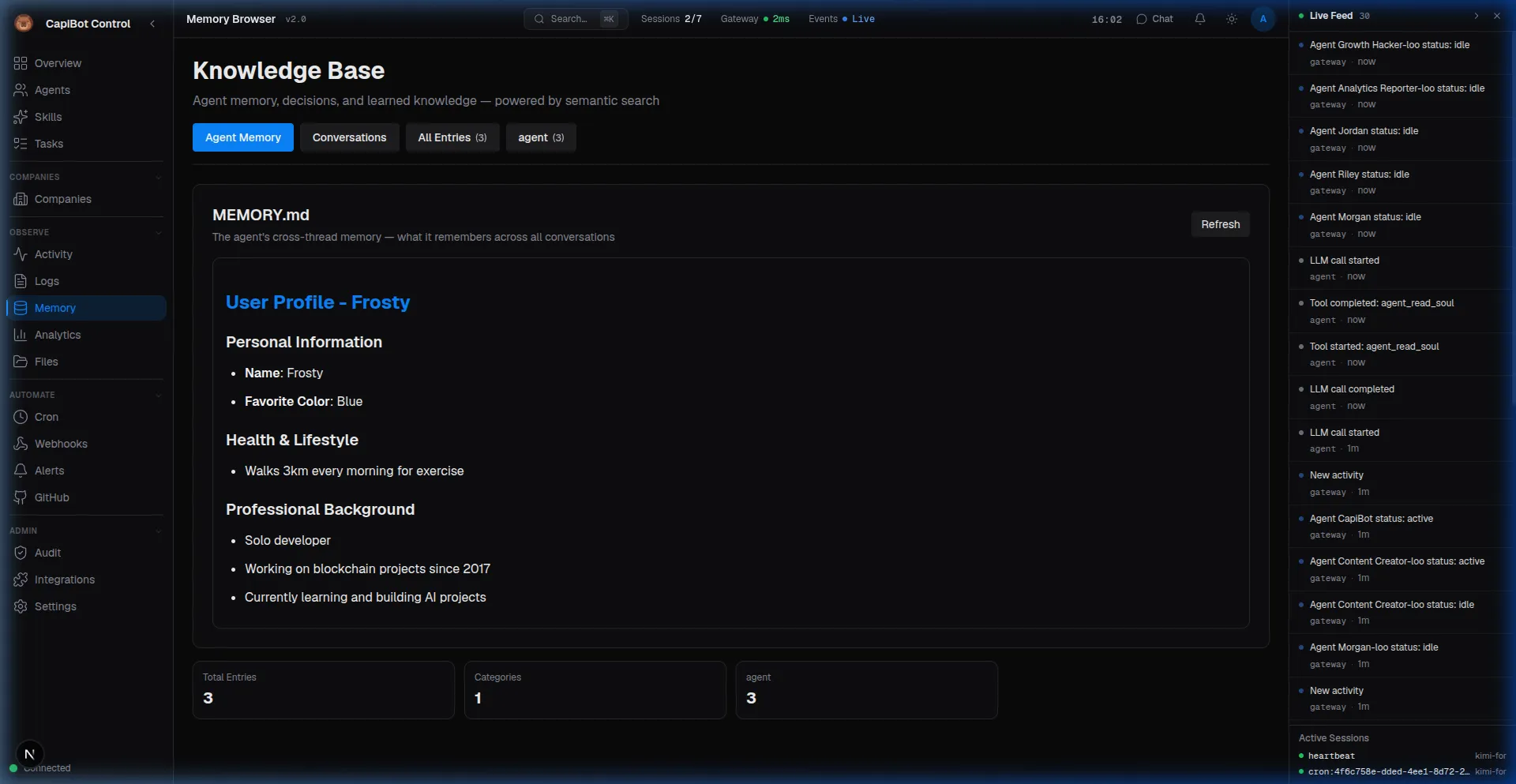 Screenshot: Memory Browser showing agent notes and semantic search results
File Tree View
┌─────────────────────────────────────────────────────────┐
│ Memory Browser                            [+ New]       │
├─────────────────────────────────────────────────────────┤
│                                                         │
│ 📁 /                                                    │
│ ├── 📁 agents/                                          │
│ │   ├── 📁 nova/                                        │
│ │   │   ├── 📄 preferences.md                           │
│ │   │   └── 📄 style-guide.md                           │
│ │   └── 📁 echo/                                        │
│ │       └── 📄 brand-voice.md                           │
│ ├── 📁 knowledge/                                       │
│ │   ├── 📄 decisions.md                                 │
│ │   └── 📁 projects/                                    │
│ └── 📁 companies/                                       │
│     └── 📁 q1-marketing/                                │
│         ├── 📄 executive-summary.md                     │
│         └── 📁 deliverables/                            │
│                                                         │
└─────────────────────────────────────────────────────────┘
Navigation:
- Click folders to expand/collapse
- Click files to view contents
- Right-click for context menu
- Drag to organize
File Viewer
View any memory file:
┌─────────────────────────────────────────────────────────┐
│ nova/preferences.md                       [Edit] [Delete]│
├─────────────────────────────────────────────────────────┤
│                                                         │
│ # Nova's Preferences                                    │
│                                                         │
│ ## Code Style                                           │
│ - Use TypeScript for all new code                      │
│ - Prefer functional components over classes            │
│ - Add JSDoc comments for public functions              │
│                                                         │
│ ## Architecture                                         │
│ - Component-based design                               │
│ - Keep components small (less than 200 lines)          │
│ - Use custom hooks for logic reuse                     │
│                                                         │
│ ## Client-Specific                                      │
│ - Their API uses snake_case                            │
│ - Authentication is JWT-based                          │
│ - Rate limit: 100 req/min                              │
│                                                         │
└─────────────────────────────────────────────────────────┘
Search
Find information across all memory:
Search: "API authentication"

Results:
📄 nova/preferences.md (mentioned 2 times)
📄 api-documentation.md (mentioned 5 times)
📄 project-alpha-specs.md (mentioned 1 time)
Search Modes:
- Hybrid — Semantic + text search (default)
- Vector — Meaning-based search
- Text — Keyword matching
Semantic Search
Find information by meaning, not just keywords.
How It Works
Powered by pgvector + Ollama embeddings:
- Content converted to vectors — Captures meaning
- Query converted to vector — Your search
- Similarity matching — Find closest meanings
- Ranked results — Most relevant first
Examples
Keyword search might miss:
Search: "login security"

Semantic finds:
- "authentication best practices"
- "password requirements"
- "JWT token handling"
- "session management"
Concept matching:
Search: "how to speed up the website"

Semantic finds:
- "performance optimization"
- "caching strategies"
- "image compression"
- "lazy loading"
Using Semantic Search
- Go to Memory panel
- Enter search query
- Select search mode: Hybrid or Vector
- Browse results
- Click to view full content
Creating Knowledge
Method 1: Direct Create
- Go to Memory panel
- Click "+ New"
- Choose location:
- Agent memory
- Knowledge base
- Company knowledge
- Write content in Markdown
- Save
Method 2: From Task
When task completes:
- Deliverables auto-saved to company knowledge
- Agent notes added to agent memory
- Decisions logged to knowledge base
Method 3: Via Message
You: @Atlas Remember that we always use
     blue for primary buttons
Atlas: Noted! I'll save that to the company
       knowledge base.
Method 4: Company Knowledge Tab
In any AI Company:
- Go to Knowledge tab
- Click "+ Add Entry"
- Write guide, link, or reference
- Categorize (Links, References, Guides)
- Save
Best Practices
For Agent Memory
- Let Agents Self-Document — They save useful info
- Review Periodically — Clean up outdated info
- Keep It Relevant — Delete old project memories
- Curate Style Guides — Ensure consistency
For Knowledge Base
- Document Decisions — Why you chose X over Y
- Log Lessons — What worked and what didn't
- Organize by Category — Easy to find
- Keep Updated — Old info is confusing
For Company Knowledge
- Write Executive Summary — Context for all agents
- Save Deliverables — Reference completed work
- Document Processes — How your company works
- Archive When Done — Keep current companies clean
Memory Management
Cleanup
System automatically cleans old data:
- Activities: 30 days
- Comms: 15 days
- Notifications: 7 days
- Audit logs: 90 days
Manual Cleanup
Archive Old Projects:
- Go to Memory browser
- Find old project folders
- Right-click → Archive
- Preserved but not searchable
Delete Unused:
- Review agent memories
- Delete outdated preferences
- Remove old style guides
Troubleshooting
Agent Forgets Preferences:
- Check agent memory exists
- Verify file format is valid Markdown
- May need to re-state preference
Search Not Finding:
- Try different keywords
- Use semantic search
- Check file is indexed (recent changes)
Too Much Memory:
- Agent responses slower
- Clean up old memories
- Archive completed projects
- Focus on relevant info
Next Steps
- Learn about Monitoring
- Set up Automation
- Explore Integrations