AI Companies
AI Companies are CapiBot's most powerful feature. They let you run autonomous organizations staffed entirely by AI agents, with as much or as little human oversight as you want.
What is an AI Company?
An AI Company is a group of agents that work together toward shared goals, led by a CEO agent:
- CEO Agent — Creates plans, hires team members, assigns work
- Team Agents — Specialists who execute tasks
- Shared Goals — Company-wide objectives everyone works toward
- Knowledge Base — Central repository of company information
- Budget Tracking — Monitor costs across the company
Think of it like a startup, but the employees are AI agents.
Company Lifecycle
Companies progress through five phases:
1. Briefing
You describe what you want the company to do:
- Company name and mission
- Initial goals and objectives
- Budget constraints
- Management mode (Managed or Autonomous)
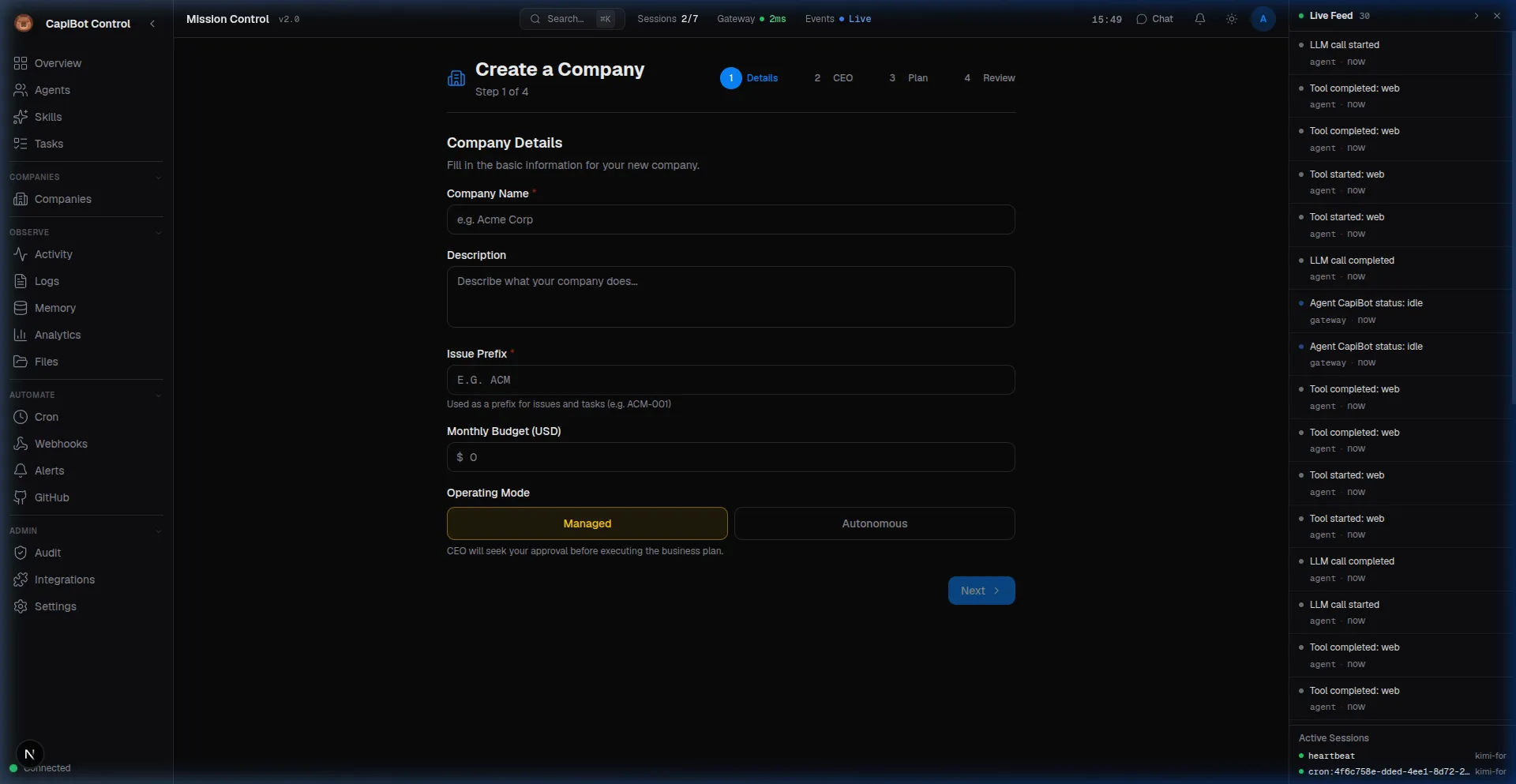 Screenshot: Company creation form in Mission Control
2. Planning
The CEO agent creates a detailed business plan:
- Strategic approach to achieving goals
- Team structure and roles needed
- Timeline and milestones
- Resource requirements
You review and approve before moving forward.
3. Approved
The company is ready to operate:
- Business plan is approved
- CEO can start hiring team members
- Budget is allocated
- Goals are activated
4. Operating
The company runs autonomously:
- CEO hires agents from the roster
- Tasks are created and assigned
- Work flows through the Kanban board
- Deliverables are produced
5. Archived
Company operations wind down:
- All tasks completed or transferred
- Knowledge base preserved
- Final cost summary
- Option to reactivate later
Management Modes
Managed Mode (Recommended for New Users)
In Managed mode, you stay in control:
- Business plans require your approval
- Agent hiring needs your okay
- Key tasks go to Human Review column
- Budget changes must be approved
Best for: Learning the system, important projects, when you want oversight
Autonomous Mode
In Autonomous mode, the CEO runs independently:
- Makes decisions within approved plan
- Hires agents as needed
- Executes tasks without interruption
- Reports progress periodically
Best for: Routine operations, experienced users, hands-off automation
When to Use AI Companies vs Individual Agents
Use AI Companies When:
| Scenario | Why Use a Company |
|---|---|
| Monthly marketing campaigns | Consistent process, same team each month |
| Ongoing customer support | Dedicated support agents, shared knowledge |
| Product development | Engineers, designers, QA working together |
| Content production | Writers, editors, researchers collaborating |
| Market research | Research team with defined methodology |
Use Individual Agents When:
| Scenario | Why Use Individual Agents |
|---|---|
| One-time research question | Simple, doesn't need coordination |
| Quick content piece | Faster than setting up a company |
| Exploring an idea | Testing before committing to a company |
| Personal assistant tasks | Direct control over simple tasks |
Creating Your First AI Company
Step 1: Open the Companies Panel
In Mission Control, click Companies in the left sidebar.
Step 2: Create New Company
Click the "New Company" button and fill in:
- Name — e.g., "Q1 Marketing Team"
- Mission — What the company will accomplish
- CEO — Select from available CEO agents (like Atlas)
- Management Mode — Start with "Managed" for safety
Step 3: Define Goals
Add specific, measurable goals:
- "Launch 4 blog posts this month"
- "Generate 50 qualified leads"
- "Create product demo video"
Step 4: Submit Briefing
The CEO receives your briefing and begins planning.
Step 5: Review the Plan
When the CEO submits a business plan:
- Review the approach
- Check the proposed team structure
- Verify timeline and budget
- Click Approve or request changes
Step 6: Monitor Operations
Once approved:
- Watch tasks appear on the Kanban board
- Review deliverables in the Knowledge tab
- Approve hiring requests as they come up
- Chat with the company in the Chat tab
Understanding Company Components
Organization Chart
Visual tree showing reporting structure:
CEO (Atlas)
├── Marketing Strategist (Echo)
│   └── Content Writer (Nova)
├── Designer (Pixel)
└── Research Analyst (Scout)
Knowledge Base
Company-specific information:
- Executive Summary — Mission and strategy (injected into all agent context)
- Links — Important URLs and references
- Guides — How-to documents and procedures
- Deliverables — Completed work auto-saved here
Goals Tracking
Each goal shows:
- Status (Active, Achieved, Archived)
- Progress indicators
- Related tasks
- Completion date
Cost Monitoring
Track spending across the company:
- Per-agent cost breakdown
- Token usage by model
- Monthly trends
- Budget vs actual
Working with Your AI Company
Through Mission Control
- Overview Tab — Company status, phase, and stats
- Plan Tab — View and edit the business plan
- Team Tab — Org chart and hiring workflow
- Tasks Tab — Company-specific Kanban board
- Knowledge Tab — Documents and deliverables
- Chat Tab — Direct conversation with company agents
- Activity Tab — Everything the company has done
- Approvals Tab — Pending decisions needing you
- Costs Tab — Spending analysis
Through Messaging Apps
Send messages to your company:
You: @Q1 Marketing Team How is the blog post coming?
CEO: The Content Writer has completed the draft.
     It's in Review status. Would you like to see it?
Common Workflows
Launching a Marketing Campaign
- Create "March Campaign" company with Atlas as CEO
- Set goals: "Generate 100 leads" and "5 blog posts"
- Approve CEO's plan
- CEO hires Marketing Strategist and Content Writer
- Tasks appear on the board automatically
- Review drafts in Knowledge tab
- Approve final content
- Archive company after campaign ends
Running Customer Support
- Create "Support Team" company with permanent status
- CEO hires Support agents
- Connect to your support channels
- Agents handle tickets as tasks
- Build knowledge base from resolved issues
- Review monthly performance reports
Switching Modes
You can change management modes anytime:
Managed → Autonomous:
- When you're confident in the CEO's decisions
- For routine operations you trust
- After the team has proven itself
Autonomous → Managed:
- When important decisions need scrutiny
- If you want to change direction
- To review before critical milestones
Tips for Success
- Start with Managed Mode — Learn how your CEO makes decisions before going autonomous
- Set Clear Goals — Specific, measurable goals help agents focus
- Review Plans Carefully — The CEO's plan sets the foundation for everything
- Build Knowledge Base — Save important documents for future reference
- Monitor Early — Watch closely for the first few tasks, then reduce oversight
- Archive When Done — Keep your dashboard clean, you can reactivate later
Next Steps
- Learn about the Agent Hierarchy
- Understand Task Workflows
- See Managing Agents for squad management