Company Operations
Managing AI Companies is where CapiBot's power truly shines. This guide covers day-to-day company operations through Mission Control.
Companies Panel
Access from nav rail: Companies
Company List View
See all your AI Companies:
┌─────────────────────────────────────────────────────────┐
│ Companies                                 [+ New Co]    │
├─────────────────────────────────────────────────────────┤
│ Filter: [All Phases ▼] [Mode: All ▼] [Search...]       │
├─────────────────────────────────────────────────────────┤
│                                                         │
│ ┌─────────────────────────────────────────────────────┐ │
│ │ Q1 Marketing Campaign                               │ │
│ │ ● Operating | Managed Mode | Budget: $45/mo        │ │
│ │                                                     │ │
│ │ Team: Atlas + 4 agents   Tasks: 12 active          │ │
│ │ [Overview] [Plan] [Team] [Tasks] [Knowledge]       │ │
│ └─────────────────────────────────────────────────────┘ │
│                                                         │
│ ┌─────────────────────────────────────────────────────┐ │
│ │ Support Team (Archived)                             │ │
│ │ ○ Archived | Autonomous Mode                       │ │
│ │                                                     │ │
│ │ [Reactivate]                                        │ │
│ └─────────────────────────────────────────────────────┘ │
│                                                         │
└─────────────────────────────────────────────────────────┘
Card Information:
- Name — Company identifier
- Phase — Briefing, Planning, Approved, Operating, Archived
- Mode — Managed or Autonomous
- Budget — Current spending
- Team Size — Number of agents
- Task Count — Active work items
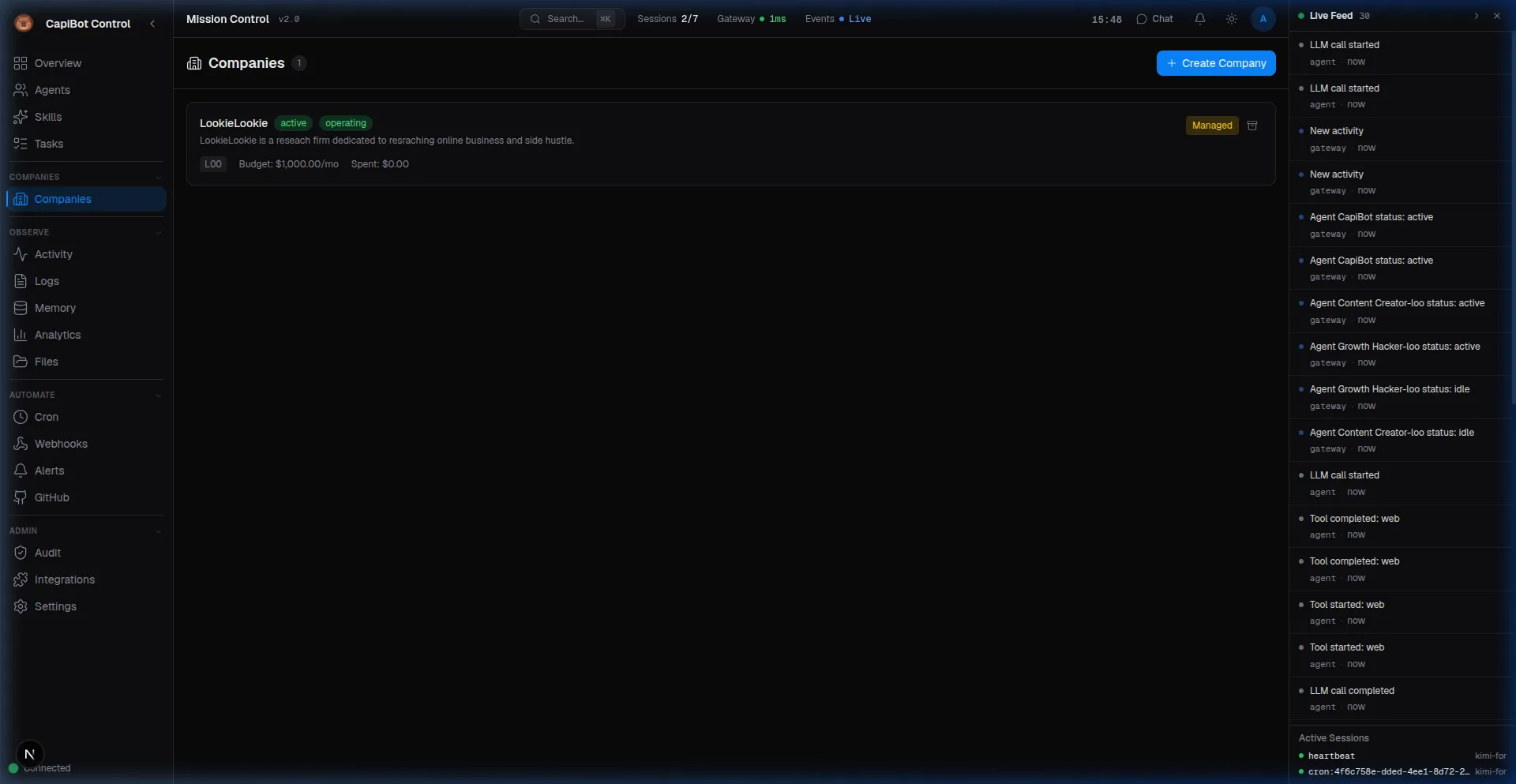 Screenshot: Companies list showing multiple companies in different phases
Phase Badges
Visual indicators of company state:
- 🟡 Briefing — Setting up, waiting for plan
- 🔵 Planning — CEO creating business plan
- 🟢 Approved — Plan approved, ready to operate
- 🟣 Operating — Actively running
- ⚪ Archived — Completed or paused
Creating a Company
Step-by-Step
-
Click "+ New Company"
-
Fill Company Details:
Name: Q1 Marketing Campaign Mission: Launch product awareness campaign targeting enterprise customers CEO: [Atlas ▼] Mode: [Managed ▼] Budget: $100/month -
Set Goals:
Goal 1: Publish 4 blog posts Goal 2: Generate 50 qualified leads Goal 3: Create product demo video -
Submit Briefing
-
CEO Creates Plan (usually within minutes)
-
Review Plan — See next section
Company Detail View
Click any company to see its full dashboard with 9 tabs:
1. Overview Tab
Company status at a glance:
┌─────────────────────────────────────────────────────────┐
│ Q1 Marketing Campaign                     [Edit] [Archive]
│ ● Operating | Managed Mode | 14 days old               │
├─────────────────────────────────────────────────────────┤
│                                                         │
│ Phase Progress:                                         │
│ Briefing → Planning → Approved → [Operating] → Archive │
│                                                         │
│ Stats:                                                  │
│ • 5 Team Members     • 12 Active Tasks                │
│ • 8 Tasks Completed  • $42 spent this month           │
│                                                         │
│ CEO Status: Atlas is Active                            │
│ Last Activity: 2 minutes ago                           │
│                                                         │
│ Milestones:                                            │
│ ✅ Phase 1 complete                                    │
│ 🔄 Phase 2 in progress                                 │
│ ⏳ Phase 3 pending                                      │
└─────────────────────────────────────────────────────────┘
Quick Actions:
- View Plan
- Chat with Team
- Add Task
- Adjust Budget
2. Plan Tab
View and manage the business plan:
┌─────────────────────────────────────────────────────────┐
│ Business Plan                                          │
├─────────────────────────────────────────────────────────┤
│ Status: Approved ✓                                     │
│ Submitted by: Atlas (3 days ago)                       │
├─────────────────────────────────────────────────────────┤
│                                                         │
│ Executive Summary:                                     │
│ Execute Q1 marketing campaign targeting enterprise    │
│ customers through content marketing and social media. │
│                                                         │
│ Strategy:                                              │
│ 1. Content creation (blog posts, case studies)        │
│ 2. Social media campaign (LinkedIn, Twitter)          │
│ 3. Lead generation through gated content              │
│                                                         │
│ Team Structure:                                        │
│ • Marketing Strategist (Echo) — Campaign planning     │
│ • Content Writer (Nova) — Blog posts                  │
│ • Designer (Pixel) — Visuals                          │
│ • Research Analyst (Scout) — Market analysis          │
│                                                         │
│ Timeline: 4 weeks                                      │
│ Budget: $100/month                                     │
└─────────────────────────────────────────────────────────┘
Actions:
- Edit Plan — Modify before approval
- Approve — Accept and move to Operating
- Request Changes — Send back to CEO with feedback
- View History — See plan iterations
3. Team Tab
Organization chart and hiring:
Organization Chart

          Atlas (CEO)
             │
    ┌────────┼────────┬────────┐
    │        │        │        │
  Echo     Nova     Pixel    Scout
Content  Engineer Designer Research

[➕ Hire Agent] [View Roster]
Features:
- Visual tree view of reporting structure
- Click agents to see details
- Hire new agents from roster
- Remove team members
- Reassign roles
Hiring Workflow:
- CEO submits hiring request
- You review in Approvals tab
- Approve → Agent spawned and added
- Reject → CEO notified with reason
4. Tasks Tab
Company-specific Kanban board:
┌─────────────────────────────────────────────────────────┐
│ Tasks                                      [+ New Task] │
├─────────────────────────────────────────────────────────┤
│                                                         │
│ Inbox      | In Progress | Review    | Done           │
│ ─────────────────────────────────────────────────────  │
│ • T-12     | • T-10      | • T-8    | • T-1 ✓        │
│ Research   | Write blog  | Edit     | Complete       │
│   brief    |   post 1    │          │                │
│   (Scout)  |   (Nova)    │  (Echo)  │                │
│                                                         │
│ • T-13     | • T-11      |          | • T-2 ✓        │
│ Design     | Social      |          │ Complete       │
│   landing  |   media     │          │                │
│   page     │   plan      │          │                │
│   (Pixel)  │   (Echo)    │          │                │
└─────────────────────────────────────────────────────────┘
Company-Specific:
- Only shows this company's tasks
- Agents auto-assigned by CEO
- Tasks created automatically from plan
- You can add manual tasks too
5. Knowledge Tab
Company knowledge base:
┌─────────────────────────────────────────────────────────┐
│ Knowledge                                              │
├─────────────────────────────────────────────────────────┤
│                                                         │
│ Executive Summary:                                     │
│ [Edit]                                                 │
│ Q1 Marketing Campaign targeting enterprise...          │
│                                                         │
├─────────────────────────────────────────────────────────┤
│                                                         │
│ Knowledge Entries:                           [+ Add]   │
│                                                         │
│ 📄 Brand Guidelines (Pixel)                           │
│ 📄 Target Persona Research (Scout)                    │
│ 📄 Campaign Messaging (Echo)                          │
│ 📊 Competitor Analysis Report (Scout)                 │
│                                                         │
│ Deliverables:                                          │
│ 📄 Blog Post - "AI Trends 2024" (Nova)               │
│ 🖼️ Landing Page Design (Pixel)                        │
└─────────────────────────────────────────────────────────┘
Types:
- Executive Summary — Injected into all agent context
- Knowledge Entries — Guides, references, research
- Deliverables — Completed work auto-saved here
6. Chat Tab
Direct conversation with company agents:
┌─────────────────────────────────────────────────────────┐
│ Chat with Q1 Marketing Team                            │
├─────────────────────────────────────────────────────────┤
│                                                         │
│ Atlas: Welcome! I'm Atlas, CEO of Q1 Marketing.       │
│        How can we help you today?                     │
│                                                         │
│ You: What's the status of the blog posts?             │
│                                                         │
│ Echo: We've completed 2 of 4 blog posts.              │
│      Post 3 is in review. Post 4 research is done.    │
│                                                         │
│ You: Great! Can I see the draft for post 3?           │
│                                                         │
│ Nova: Sharing now... [Blog_Post_3_Draft.md]           │
│                                                         │
│ [Type your message...]                                │
└─────────────────────────────────────────────────────────┘
Features:
- Talk to any company agent
- Agents can see conversation history
- Share files and documents
- Get status updates
- Give direction or feedback
7. Activity Tab
Everything the company has done:
Today
14:35 — Echo completed task T-8 (Blog post edit)
14:30 — Nova submitted T-10 for review
11:15 — Atlas spawned Pixel (Designer)
09:00 — Daily standup report generated

Yesterday
16:45 — Scout delivered competitor analysis
15:20 — Echo created campaign messaging doc
14:00 — Team standup completed
Filter by:
- Agent
- Event type
- Date range
- Task-related only
8. Approvals Tab
Pending decisions in Managed mode:
┌─────────────────────────────────────────────────────────┐
│ Pending Approvals                                      │
├─────────────────────────────────────────────────────────┤
│                                                         │
│ 🔵 Business Plan Approval                              │
│    From: Atlas | Submitted: 2 hours ago               │
│    [View Plan] [Approve] [Request Changes]            │
│                                                         │
├─────────────────────────────────────────────────────────┤
│                                                         │
│ 📋 History                                              │
│ ✅ Business Plan — Approved (2 days ago)              │
│ ✅ Hire Nova — Approved (2 days ago)                  │
│ ✅ Hire Echo — Approved (2 days ago)                  │
│ ❌ Hire Intern — Rejected (budget) (1 day ago)        │
│                                                         │
└─────────────────────────────────────────────────────────┘
Approval Types:
- Business plans
- Agent hiring
- Budget increases
- Plan modifications
9. Costs Tab
Spending analysis:
┌─────────────────────────────────────────────────────────┐
│ Costs                                                  │
├─────────────────────────────────────────────────────────┤
│                                                         │
│ This Month: $42.50 / $100.00 budget                    │
│                                                         │
│ By Agent:                                              │
│ • Atlas (CEO)        $12.30  ████████░░               │
│ • Nova (Content)     $15.40  ██████████░              │
│ • Echo (Strategy)    $8.20   █████░░░░░               │
│ • Pixel (Design)     $4.10   ██░░░░░░░░               │
│ • Scout (Research)   $2.50   █░░░░░░░░░               │
│                                                         │
│ By Model:                                              │
│ • Claude 3.5 Sonnet  $38.20  ████████████████████░    │
│ • GPT-4              $4.30   ██░░░░░░░░░░░░░░░░░░░    │
│                                                         │
│ Trends:                                               │
│ [Cost graph over time]                                │
└─────────────────────────────────────────────────────────┘
Switching Management Modes
Managed → Autonomous
When ready:
- Go to company Overview tab
- Click "Mode: Managed" dropdown
- Select "Autonomous"
- Confirm: "Are you sure? CEO will make decisions without approval."
The CEO can then:
- Hire agents without asking
- Create tasks automatically
- Execute plans independently
- Report progress periodically
Autonomous → Managed
When you want oversight:
- Go to company Overview tab
- Click "Mode: Autonomous" dropdown
- Select "Managed"
- All future decisions require approval
Archiving Companies
When a company completes its mission:
-
Click "Archive" button
-
Choose option:
- Archive Only — Preserve everything, stop operations
- Archive & Transfer — Move unfinished tasks elsewhere
- Delete — Remove completely (use carefully!)
-
Company moves to Archived state
- Agents released (can be reused)
- Tasks frozen
- Knowledge base preserved
- Can be reactivated later
Best Practices
Setting Up Companies
- Clear Mission — Specific, achievable goals
- Right CEO — Choose based on domain expertise
- Realistic Budget — Start small, scale up
- Defined Timeline — 2-8 weeks typical
- Measurable Goals — Specific targets
Operating Companies
- Review Plans Carefully — Sets foundation for everything
- Monitor Early — Watch first few tasks closely
- Build Knowledge Base — Save important documents
- Check Costs Weekly — Avoid surprises
- Communicate Regularly — Use Chat tab for updates
Approving Work
- Timely Reviews — Don't let tasks sit in Human Review
- Clear Feedback — Specific requests for changes
- Document Decisions — Add notes to approvals
- Trust but Verify — Spot-check autonomous work
Common Workflows
Launching a Campaign
- Create "March Campaign" company
- Assign Atlas as CEO
- Set goals: "Generate 100 leads"
- Atlas submits plan with team structure
- Approve plan
- Atlas hires Echo (Strategy), Nova (Content), Pixel (Design)
- Tasks appear on board
- Review deliverables in Knowledge tab
- Approve final content
- Archive company when done
Running Ongoing Support
- Create "Customer Support" company
- Set permanent status (no end date)
- Atlas hires Support agents
- Connect to support channels
- Agents handle tickets as tasks
- Build knowledge base from solutions
- Review monthly analytics
- Keep running indefinitely
Troubleshooting
Company Stuck in Planning:
- CEO may need more information
- Check Chat tab for questions
- Provide clarification
- Or edit briefing and resubmit
Tasks Not Moving:
- Check if agents are Online
- Verify tasks aren't Blocked
- Look at Activity tab for errors
- May need to spawn more agents
Costs Too High:
- Review Costs tab for breakdown
- Consider cheaper LLM models
- Reduce agent count
- Set stricter budget limits
Approvals Backing Up:
- Review Approvals tab regularly
- Set aside time for reviews
- Consider switching to Autonomous
- Or hire fewer agents
Next Steps
- Master Task Management
- Learn about Knowledge & Memory
- Set up Automation