Agent Hierarchy
CapiBot organizes agents into a three-tier hierarchy. Understanding these tiers helps you choose the right agent for the job and build effective teams.
The Three Tiers
Lead (CEO/Executive)
Strategic leaders with broad authority
Lead agents are your executives. They can:
- Create business plans and strategies
- Hire other agents to build teams
- Delegate work across the organization
- Access all tools and communication channels
- Make high-level decisions
Examples:
- Atlas — CEO who drafts business plans and orchestrates operations
- Helios — CTO who leads technical initiatives
- Aura — CMO who oversees marketing strategy
When to use: Running AI Companies, strategic planning, cross-functional coordination
Specialist
Domain experts with deep skills
Specialist agents are your professional team members. They:
- Have deep expertise in specific areas
- Execute complex tasks independently
- Can spawn subagents for parallel work
- Report to Lead agents
- Use advanced tools within their domain
Examples:
- Nova — Full-Stack Engineer (builds features end-to-end)
- Pixel — UI/UX Designer (creates interfaces and prototypes)
- Echo — Content Strategist (writes copy and marketing content)
- Scout — Research Analyst (market research and competitive analysis)
When to use: Technical work, creative projects, research tasks, any specialized work
Intern
Junior agents for simpler tasks
Intern agents handle routine, scoped work:
- Execute well-defined tasks
- Work under Specialist supervision
- Limited tool access for safety
- Great for repetitive work
- Lower cost than Specialists
Examples:
- Data entry agents
- Content formatting assistants
- Testing assistants
- Research gatherers
When to use: Simple, repetitive tasks, learning exercises, cost-sensitive operations
Agent Roster
CapiBot includes 145+ pre-built agents organized into categories:
| Category | Description | Example Agents |
|---|---|---|
| CEOs | Executive leadership | Atlas, Helios, Aura |
| Engineering | Software development | Nova, Cipher, Syntax |
| Design | Visual and UX design | Pixel, Canvas, Vista |
| Marketing | Campaigns and content | Echo, Pulse, Reach |
| Sales | Outreach and deals | Hunter, Closer, Scout |
| Support | Customer service | Guide, Helper, Assist |
| Product | Product management | Vision, Roadmap, Scope |
| Game Dev | Game development | Quest, Sprite, Level |
| QA & Testing | Quality assurance | Test, Check, Verify |
| Research | Analysis and research | Scout, Intel, Data |
| Orchestration | System management | Flow, Sync, Route |
| Specialized | Niche experts | Legal, Finance, HR |
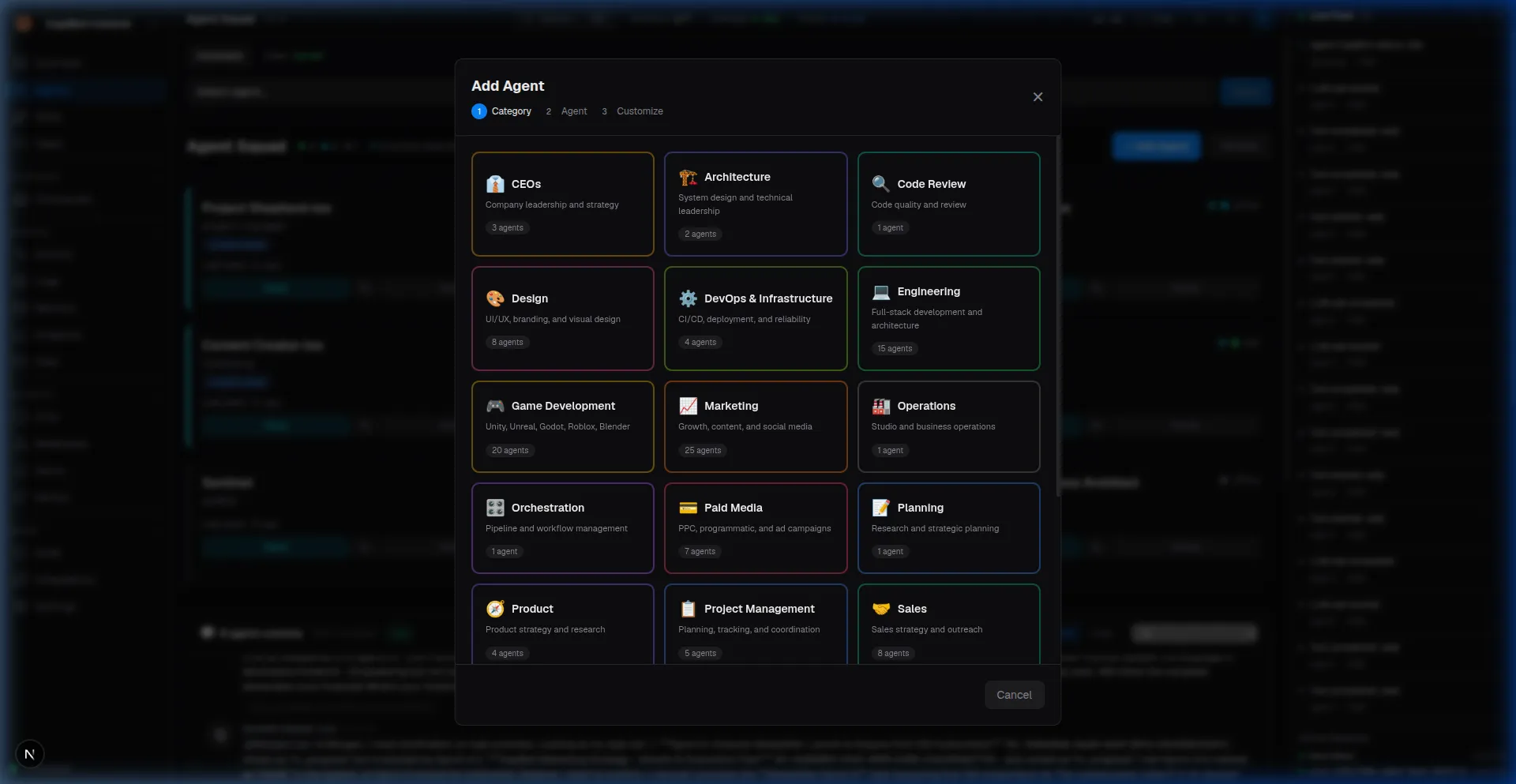 Screenshot: Agent roster browser showing categories and available agents
Choosing the Right Agent
For Individual Tasks
| Task Type | Recommended Tier | Example |
|---|---|---|
| Write a blog post | Specialist | Echo (Content Strategist) |
| Design a landing page | Specialist | Pixel (UI/UX Designer) |
| Research competitors | Specialist | Scout (Research Analyst) |
| Build a feature | Specialist | Nova (Full-Stack Engineer) |
| Format documents | Intern | DocFormatter |
| Run a campaign | Lead | Atlas (CEO) + team |
For AI Companies
Minimum Viable Team:
CEO (Lead)
└── 2-3 Specialists
    └── Optional: 1-2 Interns
Example Marketing Company:
Atlas (CEO) — Strategy and coordination
├── Echo (Content Strategist) — Campaign messaging
│   └── ContentIntern — Draft blog posts
├── Pixel (Designer) — Visual assets
└── Scout (Research) — Market analysis
Spawning Agents
What is Spawning?
Spawning creates temporary subagents for specific tasks:
- Parent agent delegates work
- Subagent works independently
- Results report back automatically
- Subagent disappears when done
When to Spawn vs Hire
| Spawn | Hire |
|---|---|
| One-time parallel tasks | Ongoing team member |
| Temporary surge capacity | Permanent role |
| Parallel data processing | Cross-project collaboration |
| Exploratory work | Core team function |
Example: A Research Analyst spawns 5 subagents to analyze 5 different competitors simultaneously, then compiles the results.
Custom Agents
Beyond the pre-built roster, you can create custom agents:
When to Create Custom Agents
- Unique Expertise — Need specialized knowledge not in roster
- Brand Voice — Agent that knows your company tone
- Proprietary Process — Follows your specific methodology
- Cost Optimization — Lighter-weight agent for simple tasks
Custom Agent Components
Every agent has a SOUL.md file containing:
- Identity — Name, role, personality
- Expertise — Skills and knowledge areas
- Operating Instructions — How they approach work
- Communication Style — Tone and formatting preferences
Example: Create a "Brand Guardian" agent that ensures all content matches your style guide.
Agent Capabilities
What All Agents Can Do
- Read and write files
- Search the web
- Send messages
- Create and update tasks
- Access memory and knowledge
- Communicate with other agents
What Lead Agents Can Do (Extra)
- Submit business plans
- Hire agents to companies
- Approve budgets (in autonomous mode)
- Orchestrate multi-agent workflows
What Specialists Can Do (Extra)
- Use domain-specific tools
- Spawn subagents
- Review and approve work
- Train Intern agents
Memory and Context
Each agent has persistent memory:
- Personal Memory — Notes and learnings across conversations
- Company Context — Knowledge from their AI Company
- Shared Memory — Information accessible to all agents
- Session Memory — Current conversation context
Agents remember past interactions and build on previous work.
Working with Agents
Through Mission Control
Agent Squad Panel:
- View all active agents
- Check status (idle, busy, offline)
- Spawn new agents
- Access agent details
Agent Detail View:
- Overview — Status, company, recent activity
- SOUL — Personality and instructions
- Memory — Personal notes and context
- Tasks — Assigned work
- Activity — History of actions
- Config — Settings and overrides
Through Messaging Apps
Chat directly with any agent:
Telegram:
You: @Nova Build me a login form
Nova: I'll create a login form for you.
      Should it include social login options?
Slack:
You: @Echo Write a product announcement
Echo: Working on it! What's the key feature
      we should highlight?
WhatsApp:
You: @Scout Research our competitors
Scout: I'll analyze the top 5 competitors
       in your space. Check Mission Control
       for the full report in ~10 minutes.
Agent Status
Agents show their current state:
- Idle — Available and waiting for work
- Active — Currently working on a task
- Busy — Occupied with ongoing work
- Offline — Not currently running
- Error — Encountered a problem
- Archived — Not in use (can be reactivated)
Best Practices
- Match Agent to Task — Use Specialists for complex work, Interns for simple tasks
- Start Simple — Begin with individual agents before creating companies
- Build Teams Thoughtfully — Ensure complementary skills in company teams
- Monitor Early — Watch new agents closely until you trust their work
- Use Spawning Wisely — Spawn for parallel work, hire for ongoing roles
- Archive When Done — Keep your squad clean and manageable
Common Patterns
Pattern 1: Single Agent Workflow
You → Agent → Result
Quick tasks, direct control
Pattern 2: Sequential Handoff
Researcher → Writer → Editor
Workflow pipeline, quality gates
Pattern 3: Parallel Team
      ┌── Agent A ──┐
You ──┼── Agent B ──┼── Results
      └── Agent C ──┘
Multiple perspectives, fast execution
Pattern 4: AI Company
You → CEO → Team → Deliverables
       ↑______↓
       (Reports back)
Autonomous operation with oversight
Next Steps
- Learn about Task Workflows
- See Managing Agents for day-to-day operations
- Understand AI Companies for team-based work